
Skip to content
FM360AI
Menu

Tickets and SLAs

Every job has an owner, a clock and a record of what was done

FM360AI calls the unit of work a ticket; you may call it a work order. Either way it carries the request, the people assigned, the SLA it is being measured against, the checklist, the photos and the sign-off, in one place.

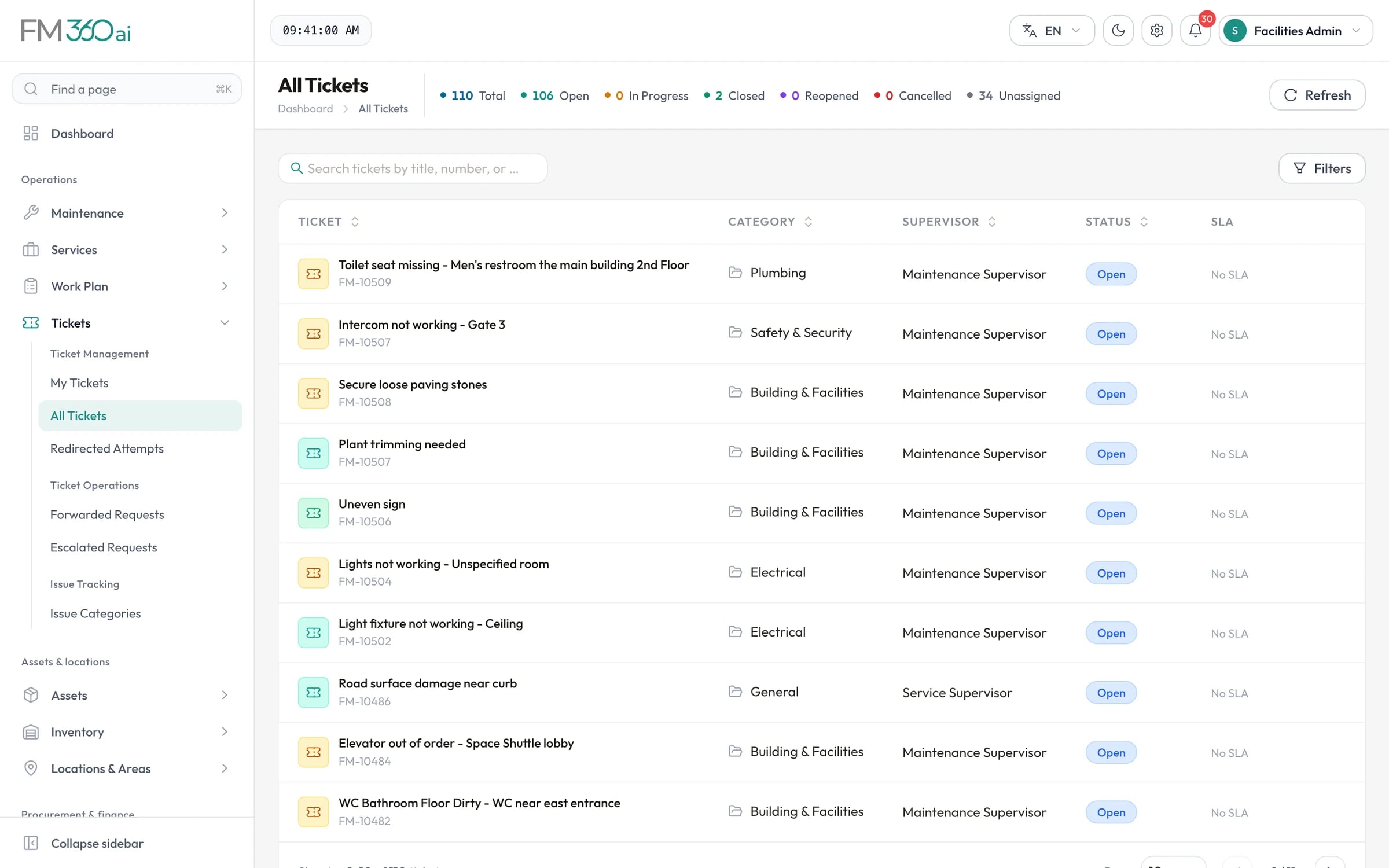
All Tickets list with ticket titles and numbers, category, supervisor, status and SLA columns, and counts of open, closed and unassigned tickets

Swipe the screenshot to see all of it.

Screens are from an FM360AI demo environment. Names and contact details have been replaced.

The problem

Work that is assigned verbally cannot be measured

Most facilities teams do the work. What they cannot do is show it: who was asked, when they started, what they found, and whether it was finished properly.

  • Jobs are handed out by phone and tracked in someone's memory.
  • Deadlines exist in a contract but not on the job itself.
  • Completion means the technician said so.

What FM360AI does

Tickets and SLAs, in detail

Assign to a person, several people or a team

Assign one technician, pick several with a working date, or assign a technician team so that each member gets the job on their phone. The ticket is resolved when every assigned person has completed their part.

  • Forward a ticket to another supervisor, who approves or rejects it
  • Escalate to a named person, in the app or from an emailed approval link
  • Merge duplicates, and split work into parent and child tickets
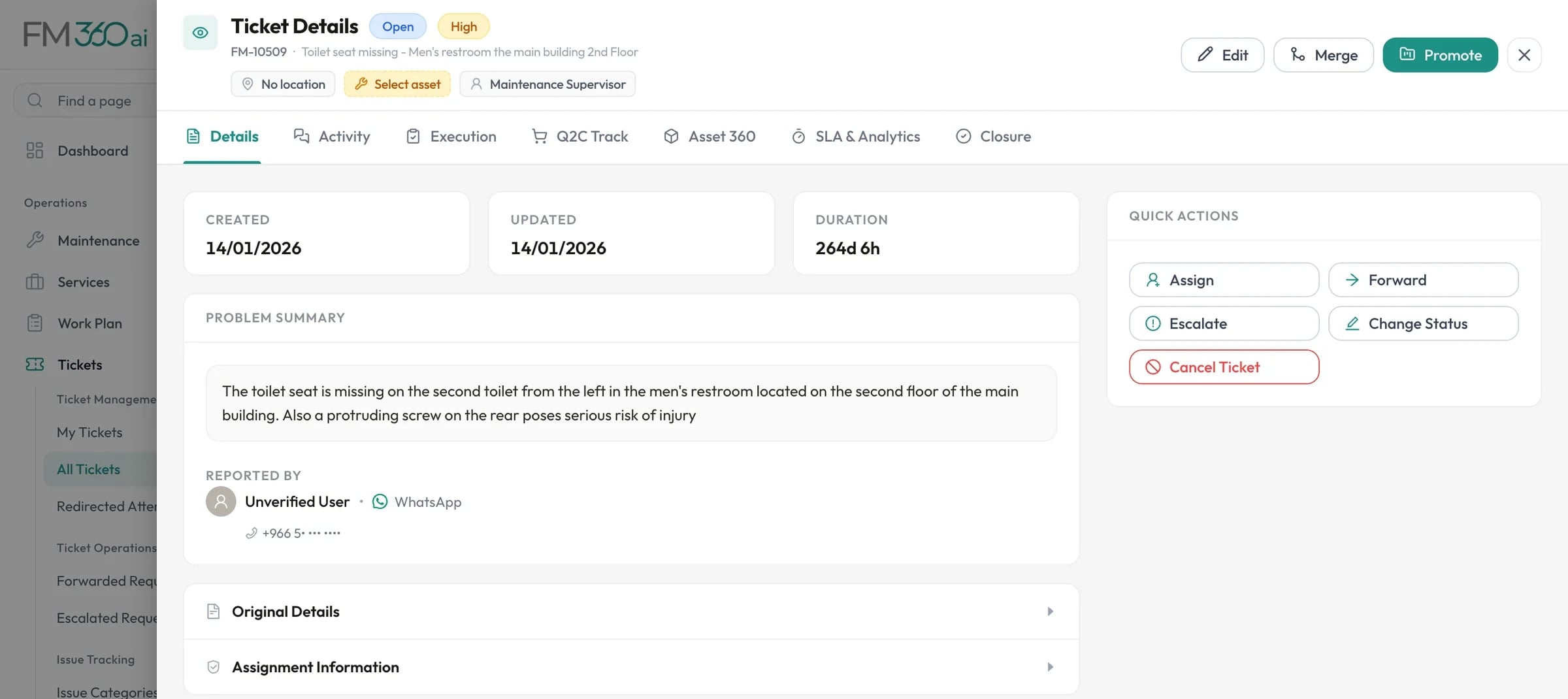
Ticket details for a request reported by WhatsApp, with the problem summary, reporter, and quick actions to assign, forward, escalate or change status

Swipe the screenshot to see all of it.
Response and completion SLAs

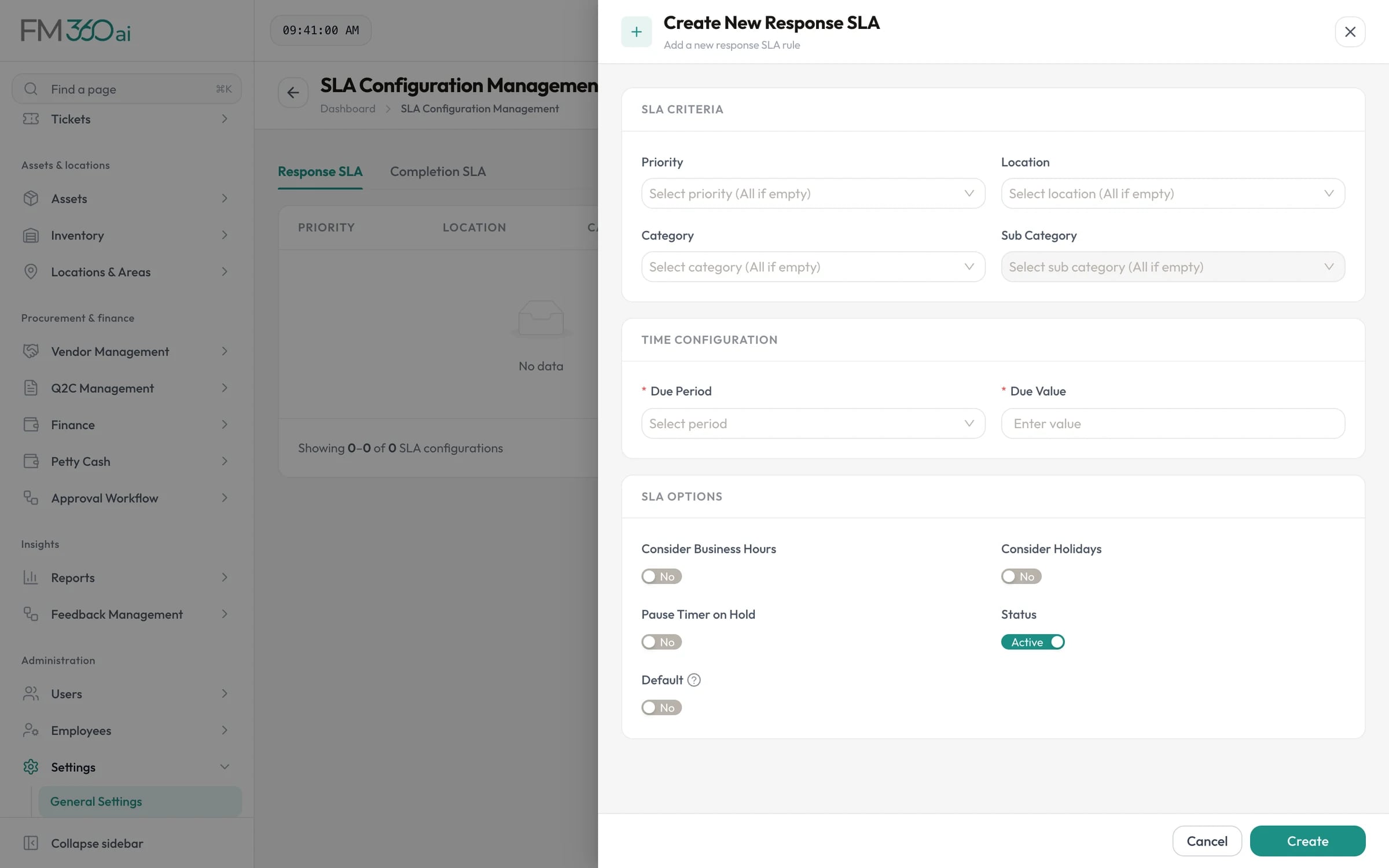
Define SLA targets by priority, category, sub-category and location, in minutes, hours or days. When a ticket is created the most specific matching policy is attached, and the ticket shows a live countdown for both response and completion. Putting a ticket on hold can pause the clock.

Create response SLA form with criteria for priority, location, category and sub-category, a due period, and a pause-on-hold option

Swipe the screenshot to see all of it.
Checklists and QA rules on the job

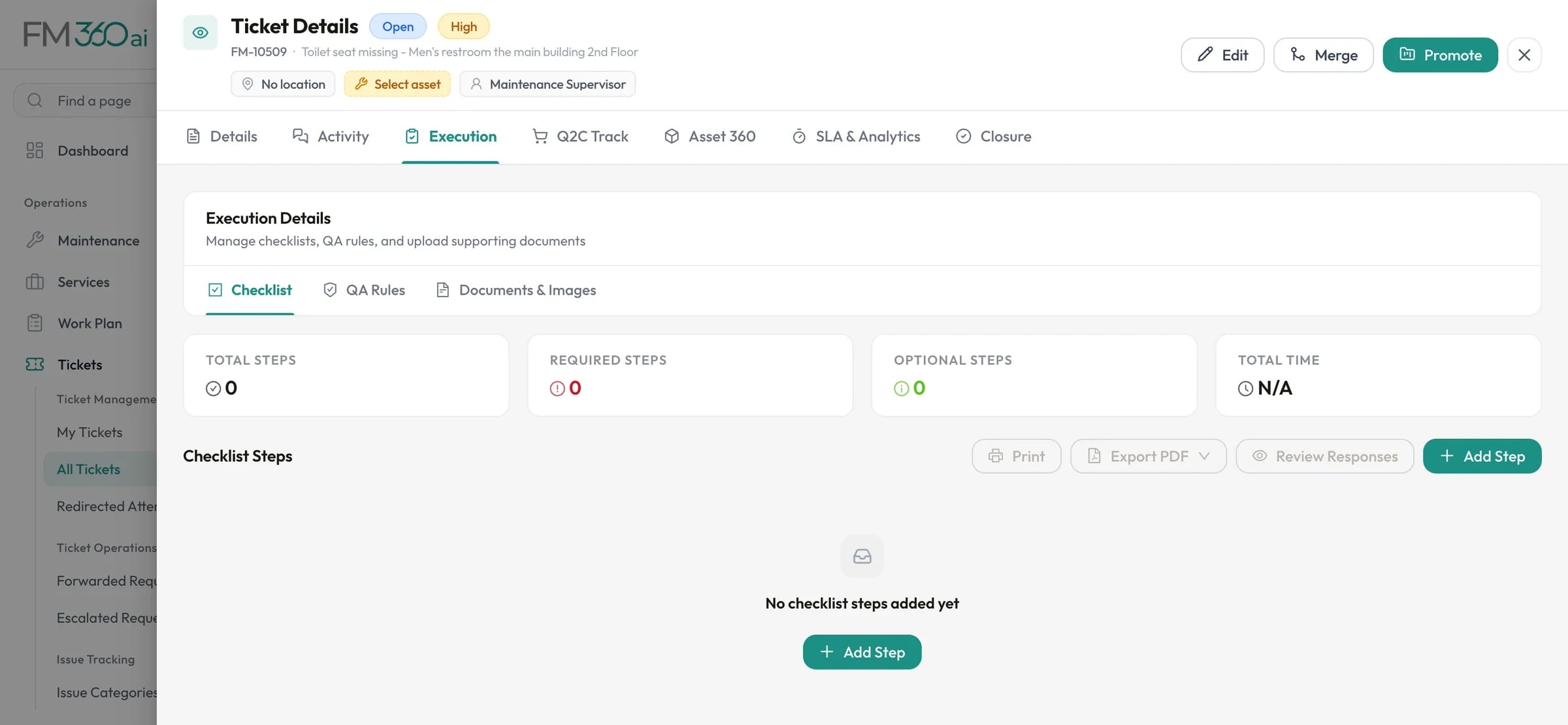
Each ticket can carry a checklist of numbered steps with required flags, time estimates and safety notes. Supervisors approve or reject each response. QA rules add a final quality gate: approve them all and the ticket closes; reject one and it reopens.

Execution tab of a ticket with checklist, QA rules and documents sections and counts of required and optional steps

Swipe the screenshot to see all of it.
Closure with evidence

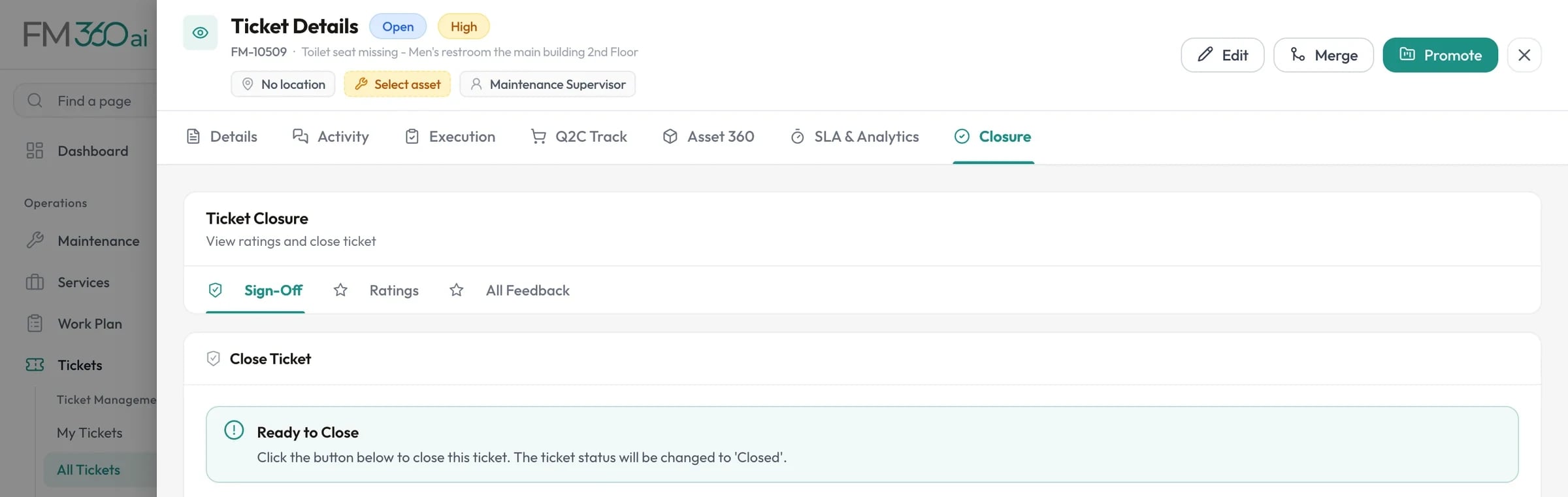
The closure view puts the technicians' checklist answers next to their before and after photos, so sign-off is a review rather than a formality. A closure reason is required, and the reporter is notified.

Closure tab of a ticket with sign-off, ratings and feedback sections and a closure timeline

Swipe the screenshot to see all of it.
Feedback from the person who asked

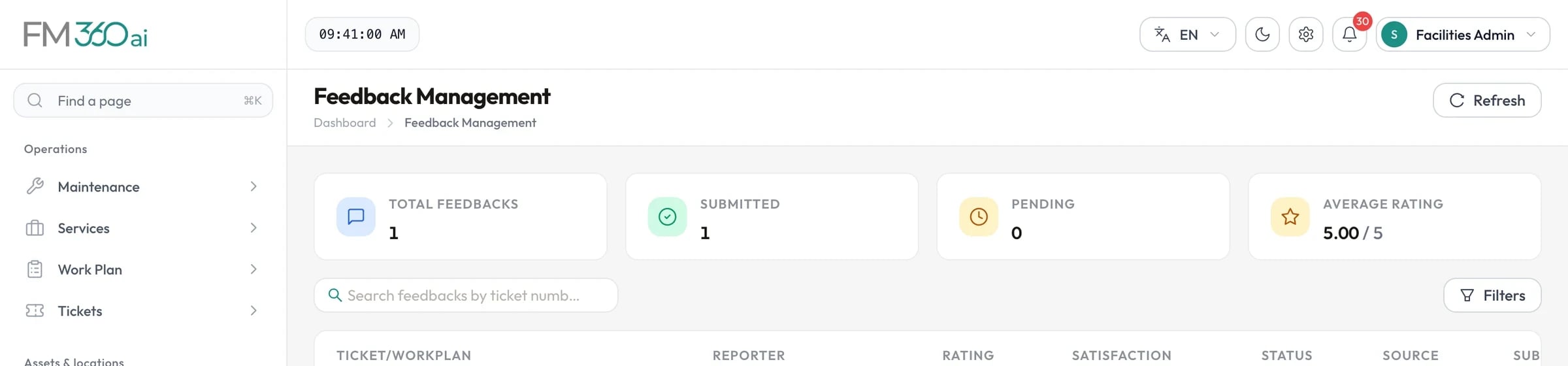
When a ticket closes, the reporter is asked to rate the work from one to five and leave a comment: in the app, or by WhatsApp or email for tickets that arrived that way. Ratings appear in Feedback Management and in the performance reports.

Feedback management showing total, submitted and pending feedback, average rating, and a rated ticket

Swipe the screenshot to see all of it.
A ticket list built for triage

The list shows status, priority, category, supervisor, SLA and source at a glance, with running counts of open, in-progress, reopened and unassigned tickets above it. Filter by any of them, or by location, asset, date and parent or child tickets.

How it works

The life of a ticket

  1. Step 1

    Open

    Created from an incoming message, the mobile app, the web console, or a recurring maintenance schedule. The matching SLA is attached.

  2. Step 2

    Assigned

    A supervisor assigns a technician, several technicians or a team. Each assignee receives a push notification.

  3. Step 3

    In progress

    The technician uploads a before photo and starts work, then completes the checklist on their phone.

  4. Step 4

    Resolved

    An after photo is added and the work is marked complete. The ticket waits for the supervisor's review.

  5. Step 5

    Closed

    The supervisor reviews the evidence, records a closure reason and closes the ticket. The reporter is asked for feedback.

Who uses it

Supervisors
Assign, follow up and close with the evidence in front of them.
Technicians
See today's jobs, what each needs, and what counts as done.
FM managers
Read SLA compliance and workload from data, not from asking around.
FM360AI for in-house facilities teams

Good to know

The scope and limits of this part of the product, so there are no surprises later.

  • Statuses are open, assigned, in progress, on hold, resolved, closed, reopened and cancelled.
  • SLA targets are measured in elapsed time from when the ticket was created. Working-hours calendars are not applied to SLA calculation today.
  • Escalation is a decision a person makes: someone raises an escalation request and the recipient approves it. Tickets are not escalated automatically when a deadline passes.
  • Each ticket also has a one-to-one chat between team members, threaded comments, and an activity timeline that records what changed and who changed it.

Questions about tickets and SLAs

Is a ticket the same as a work order?

In practice, yes. FM360AI uses the word ticket for any unit of work, whether it started as a request from a member of staff or was generated by a preventive maintenance schedule. Larger planned work that groups several tickets is called a work plan.

How are SLA targets chosen for a ticket?

You define policies by priority, category, sub-category and location. When a ticket is created, FM360AI attaches the most specific active response policy and completion policy that match it. A supervisor can also select a policy on the ticket.

Can more than one technician work on the same ticket?

Yes. Assign several people or a whole team. Each person records their own before and after photos and marks their own work complete, and the ticket moves to resolved once everyone has finished.

Can vendors be involved in a ticket?

Yes. From a ticket you can request quotations from vendors, raise purchase orders and track the related documents in the ticket's Q2C tab, so the cost of a job stays attached to the job.

What does the reporter see?

Reporters using the mobile app can follow status, see who is assigned and add comments. Reporters who used WhatsApp or email receive an acknowledgement when the ticket is created and a completion message with a feedback link when it is closed.

See FM360AI with your own buildings in mind

Tell us how requests reach your team today and what you maintain. We will walk you through the product on a call, using the workflows that matter to you.

  • A walkthrough of the real product, not slides
  • Time for your questions about fit and limits
  • No obligation to continue